
Cohorts
  • Discover
  • About Us
  • Blog
  • Patika.dev
  • Web3

Node.js

Node.js Nedir?
Çalışma Ortamının Kurulması
Asal Sayılar Çalışması
Node.js REPL Ortamı
Ödev 1 - Node.JS Komut Satırı Kullanımı

Node.js'in Asenkron Yapısı
Callback Nedir?
Promise Nedir?
Async - Await Yapısı
Ödev 2 - Post Sıralama ve Post Ekleme

Olay Odaklı - Bloklamayan
Modül Kavramı
Ödev 3 - Daire Modülü
FS Modülü Kullanımı
Ödev 4 - FS Modülü Çalışması
NPM ve Package.json Kavramları
Request - Response Döngüsü
Bir Web Sunucusu Yazmak
Ödev 5 - Kendi Web Sunucumuz
Express.js Giriş
Ödev 6 - Koa.js ile Web Sunucusu Yazımı

PCAT Proje Tanıtımı
PCAT Projesi Çalışma Ortamı
PCAT Projesi Express Nodemon Kurulumu
Clean Blog Proje - 1. Bölüm - Ödev 7
Statik Dosyalar - Middleware Giriş
Template Engine Kavramı
Clean Blog Proje - 2. Bölüm - Ödev 8
MongoDB Giriş
MongoDB - Compass Kurulumu
Mingo Kurulumu
MongoDB - CRUD İşlemleri
Mongoose CRUD İşlemleri
Request Body Nesnesi
Model ve Dinamik İçerik
Clean Blog Proje - 3. Bölüm - Ödev 9
Tekil Fotoğraf Sayfaları
Clean Blog Proje - 4. Bölüm - Ödev 10
Görsel Yüklemek
Fotoğraf Bilgisi Güncellemek
Fotoğraf Silmek
MVC Yeniden Düzenleme
Clean Blog Proje - 5. Bölüm - Ödev 11
PCAT Sayfalama
Heroku - MongoDB Atlas Deployment
Clean Blog Proje - 6. Bölüm - Ödev 12

Smartedu Projesi Tanıtım
HTTP Durum Kodları
Linkleri Güncellemek
Routing - Yönlendirme
Kurs Modeli
Postman ve API
Kursları Listelemek
Tekil Kurs Sayfası ve Slugify
Kategori Oluşturmak ve Listelemek
Kayıt Sayfası ve Bcrypt Paketi
Giriş Sayfası ve Giriş İşlemi
Session Nedir?
Çıkış İşlemi
Kişiye Özel İçerik
Özel Middleware
Kullanıcı Rolleri
Kurs Oluşturmak
Kurs - Öğretmen İlişkisi
Kurs - Öğrenci İlişkisi
Kurs - Öğrenci İlişkisi II
Search Alanı
İletişim Sayfası ve Mail Göndermek
Bildirim Mesajları
Kayıt ve Kullanıcı Doğrulama
Kurs Silmek
Kurs Güncellemek
Admin Alanı ve Kullanıcı Silmek
Kategori Eklemek ve Silmek
Smartedu Deployment

We understand the importance of mastering MongoDB database management. That's why we'd like to introduce you to Mingo, a user-friendly MongoDB GUI.


Mingo is designed with a graphical interface that simplifies database operations. It allows you to manage your database, create collections, and perform data-related tasks such as adding, updating, and deleting data with just a few clicks.
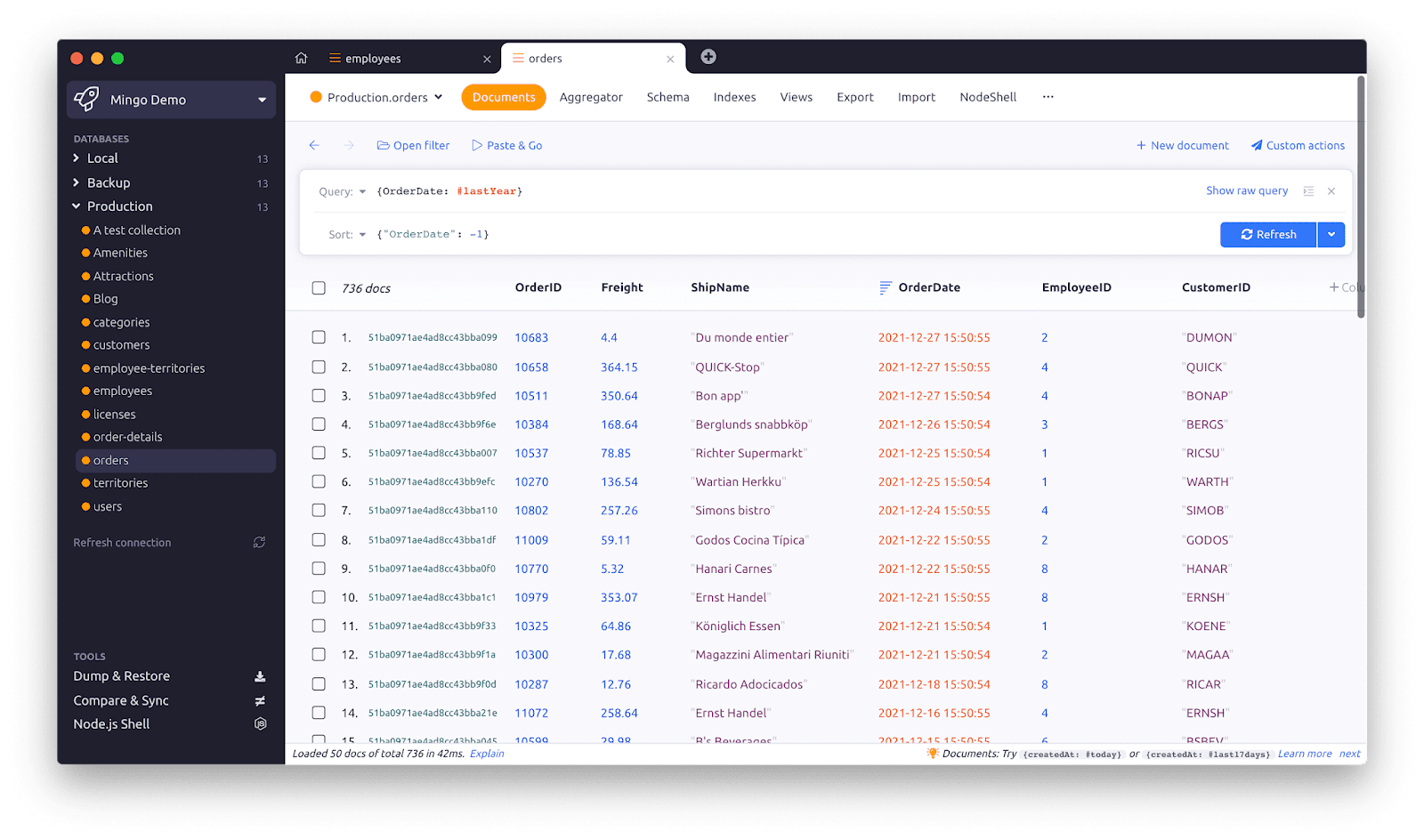


Here are the basic steps to get started with Mingo:


Step 1: Install and Launch Mingo


Begin by downloading Mingo from its official website https://mingo.io/download and installing it on your computer. Once installed, launch the Mingo application.


Step 2: Create a MongoDB Connection

When you open Mingo, you'll be prompted to create a new MongoDB connection. Enter the address of the MongoDB server and other required details to connect.


Step 3: Select Your Database

After successfully connecting, you'll see a list of available databases. Choose the database you wish to work with for your project.


Step 4: Collections and Data

Browse through the existing collections in the database. To work with a specific collection, select it, or create a new collection if needed.


Step 5: Data Operations

Thanks to Mingo's user-friendly interface, you can easily view, add, update, and delete data with ease. Efficiently manage your data with just a few clicks.


Feel free to explore more of Mingo's features through the interface and consult the official documentation for further information. https://mingo.io/docs/getting-started


We believe that MongoDB GUI Mingo will greatly enhance your database management experience. Best of luck and happy learning!


If you would like to purchase Mingo, use patika-50 at the check out to receive a 50% discount.


Previous
Next

Lesson discussion

Swap insights and ask questions about “Node.js”.

Enroll to participate
Start the course to unlock the discussion. Enrolling helps us keep conversations relevant to learners.
Cohorts
WebsiteDiscoverBlogPatika.devRise In
CoursesCircleRustSoliditySolanaWeb3 FundamentalsBlockchain Basics
CompanyAbout UsTerms of UsePrivacy PolicyGDPR NoticeCookies
Don't miss any update!

Disclaimer: The information, programs, and events provided on https://cohorts.patika.dev is strictly for upskilling and networking purposes related to the technical infrastructure of blockchain platforms. We do not provide financial or investment advice, nor do we make any representations regarding the value, profitability, or future price of any blockchain or cryptocurrency. Users are encouraged to conduct their own research and consult with licensed financial professionals before engaging in any investment activities. https://cohorts.patika.dev disclaims any responsibility for financial decisions made by users based on the information provided here.

© 2026 Cohorts, All rights reserved